Removing Backgrounds in Alight Motion Mod APK
Green Screening is a technique used in video editing where a green background is used for video production. Later, this green background is replaced with images or videos. Alight Motion is a powerful and advanced video editor for your mobile device, offering advanced chroma key or green screen magic technologies. This allows you to remove backgrounds, merge different items, and create visually appealing compositions quickly and easily, without much hassle.Green Screen Magic in Alight Motion Mod APK.
One of these advanced features is background removal, which sparks users’ curiosity about the different ways we can remove backgrounds in Alight Motion. There are three easy methods for background removal: 1) Chroma Key (green/blue screen), 2) Masking, and 3) Clipping (alpha, gradient, & luma masking).
Let’s learn these methods step by step and see how, using them, we can give our projects a professional look.

Preparing Green Screen Footage
When recording videos using the green screen feature, it’s crucial to carefully prepare the footage by considering factors such as the background, lighting, subject clothing materials, and distance between the subject and the screen.
Use a Solid Background
Always use a solid wall or screen with a vibrant color and keep it wrinkle-free. A smooth background makes chroma keying faster and more accurate.
Ensure Proper Lighting
Good lighting plays a crucial role in chroma keying. Avoid shadows and hotspots to maintain an even background color for cleaner results.
Maintain Optimal Distance
Keep enough distance between the subject and the screen to prevent shadows and ensure clean edges during the chroma keying process.
Avoid Reflective Clothing
Choose solid, non-reflective clothing to prevent color spill and reflections that can interfere with accurate background removal.
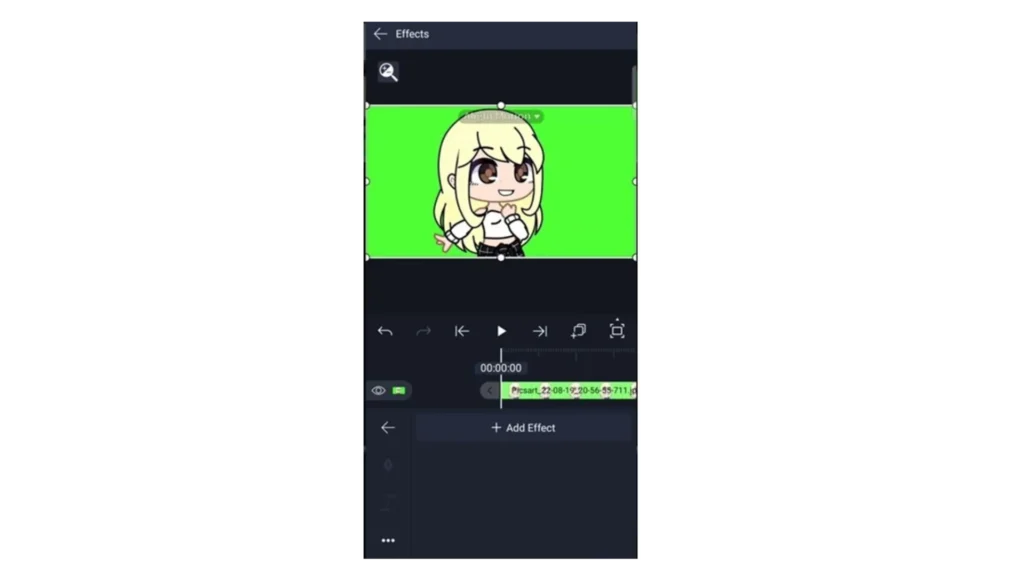
When you’re preparing to use a green screen for video editing, there are a few things to keep in mind to make sure it goes smoothly. The most important thing is to have a well-lit, solid green background. This will make it easier to remove the background and add the desired background elements accurately. By paying attention to these factors, you can ensure that your chroma keying or green screen editing process will be successful.
The power of Chroma Keying in Alight Motion Mod APK
Chroma keying is a technique used to remove the background of an image or video and replace it with another image or video. Typically, this is done using a green screen as the background. Alight Motion is a highly-rated mobile application that makes it easy to practice chroma keying. With its advanced yet user-friendly features, Alight Motion simplifies the chroma keying process, making it faster and more efficient than ever before.
Here is a simple guidance to use the chroma key feature in Alight Motion.
- First, import the image or the video with a green screen onto the editing timeline.
- Then, go to the ‘Effects’ and ‘Add effects chroma key’ feature.
- Here you can see a pop-up box with Key color, Threshold, Feather, Defringe, and invert-like features.
- The Threshold value here will be 0.1000. When you higher up this threshold value you can apply better effects.
- The Feather adjustment will allow you to have smooth edges on the replaced background. This will help for a smooth transition between the two backgrounds.
- You can use the color picker tool included in the ‘Chroma Key’ to select the color you want to remove accurately.
Alight Motion for Chroma Keying, follow the above simple steps to accurately replace your green background with any other background of your choice. It can be either a video or an image. Alight Motion is a user-friendly app that enables you to modify your video edits with a clean and natural-looking composite.
Creating Engaging Compositions with Alight Motion
Composition is the process of merging different videos, images, or green screens into a single composition. Alight Motion provides a set of advanced features to create precise and smooth compositions.
To achieve this, Alight Motion offers advanced layering and masking features. With these features, the composition process becomes stress-free and easy.
- Layering: This feature helps you add depth to your creation. Here you can arrange different layers including a green screen, background image or video, and other elements to create more visually appealing videos by adding depth.
- Masking: The masking feature included there on the Alight Motion helps you to isolate specific areas on a specific layer. This allows you to edit them separately. Or else you can apply some blending effects too.
If you want to create visually appealing video compositions, Alight Motion is the best option due to its advanced layering and masking features.
Tips and Tricks for Green Screen
Focus on Proper Lighting
Pay close attention to your lighting setup when working with green screens. Even, balanced lighting greatly improves chroma key accuracy and final video quality.
Use a Clean Background
Always use a solid, wrinkle-free background without shadows. A clean screen ensures smoother keying and reduces extra editing work.
Try Pre-Keyed Green Screens
Pre-keyed green screen assets are available online and can save a lot of time since the background is already removed.
Experiment with Layers & Masks
Use layering, masking, and compositing techniques to create visually engaging videos. Experimenting with different backgrounds can make your content stand out.
Conclusion
Alight Motion is a popular and advanced platform to edit your videos while removing background and composition with its green screen feature. If you want to make your chrome keying process an effective and efficient one make sure to adjust your green screen footage carefully. Here it is better if you select solid colors without wrinkles together with non-reflective subjects and proper lighting techniques. Also, adjust the Threshold and Feature values to fine-tune your chroma keying with clean edges.
Using the compositing feature is an amazing way to make your video more colorful and vibrant. Try different composting features together with different layering and masking to create your best composition video.
Use all these nice features included in Alight Motion wisely. These will guide you to create a unique video with a professional touch. Share them with your friends. Make all your imaginations shine with Alight Motion Chroma Keying now.Green Screen Magic in Alight Motion Mod APK.
You can refer to these online sources for more details on chroma keying for background removal and composition using Alight Motion.Green Screen Magic in Alight Motion Mod APK.